Add a Prompt
Your server now has a tool and a resource. Let's add a prompt - a reusable, parameterized message template the client can fetch and hand to the LLM.
Prerequisites: completed Add a Resource.
What is a prompt?
Prompts are pre-written message templates with {arguments}. Clients list them, the user picks one and fills in the arguments, and the server returns ready-to-use messages for the LLM.
Step 1 - Define the prompt
Create a new module for prompts and define them using the resource macros provided by rust_mcp_sdk.
...
mod prompts;
...
use rust_mcp_sdk::macros::mcp_prompt;

#[mcp_prompt(
    name = "friendly-greeting",
    title = "Friendly Greeting",
    description = "A warm greeting",
    icons = [(
        src = "https://raw.githubusercontent.com/rust-mcp-stack/rust-mcp-sdk/main/assets/prompt-icon.png",
        mime_type = "image/png",
        sizes = ["128x128"],
        theme = "light"
    )],
    messages = [
        (role = "user", content = "Write a warm and friendly greeting for {name}."),
    ]
)]
pub struct FriendlyGreeting {
    #[prompt_argument(title = "Name", description = "Who to greet")]
    name: String,
}
Step 2 - update server capabilities to include prompts
    ...
    use rust_mcp_sdk::schema::ServerCapabilitiesPrompts;
   ...
       capabilities: ServerCapabilities {
           tools: Some(ServerCapabilitiesTools::default()),
           resources: Some(ServerCapabilitiesResources::default()),
           completions: Some(serde_json::Map::new()),
           prompts: Some(ServerCapabilitiesPrompts::default()),
           ..Default::default()
       },
   ...
Step 3 - update HelloMcpHandler to handle prompt related calls
Add two handler methods to your HelloMcpHandler: one to return the list of available prompts and another to return the prompt results.
...
use crate::prompts::FriendlyGreeting;
use rust_mcp_sdk::schema::{GetPromptRequestParams, GetPromptResult, ListPromptsResult};
...
// Handle the `prompts/list` request: return the *definitions* of the prompts
// this server offers, so clients can discover them and know what arguments
// each prompt accepts.
async fn handle_list_prompts_request(
    &self,
    _params: Option<PaginatedRequestParams>,
    _runtime: Arc<dyn McpServer>,
) -> std::result::Result<ListPromptsResult, RpcError> {
    Ok(ListPromptsResult {
        prompts: vec![FriendlyGreeting::prompt()],
        meta: None,
        next_cursor: None,
    })
}

// Handle the `prompts/get` request: return the *messages* a prompt produces,
// with the client's arguments substituted in.
async fn handle_get_prompt_request(
    &self,
    params: GetPromptRequestParams,
    _runtime: Arc<dyn McpServer>,
) -> Result<GetPromptResult, RpcError> {
    match params.name.as_str() {
        FriendlyGreeting::PROMPT_NAME => {
            Ok(FriendlyGreeting::from_arguments(params.arguments.as_ref())?.render())
        }
        other => {
            return Err(
                RpcError::invalid_params().with_message(format!("Unknown prompt: {other}"))
            );
        }
    }
}
...
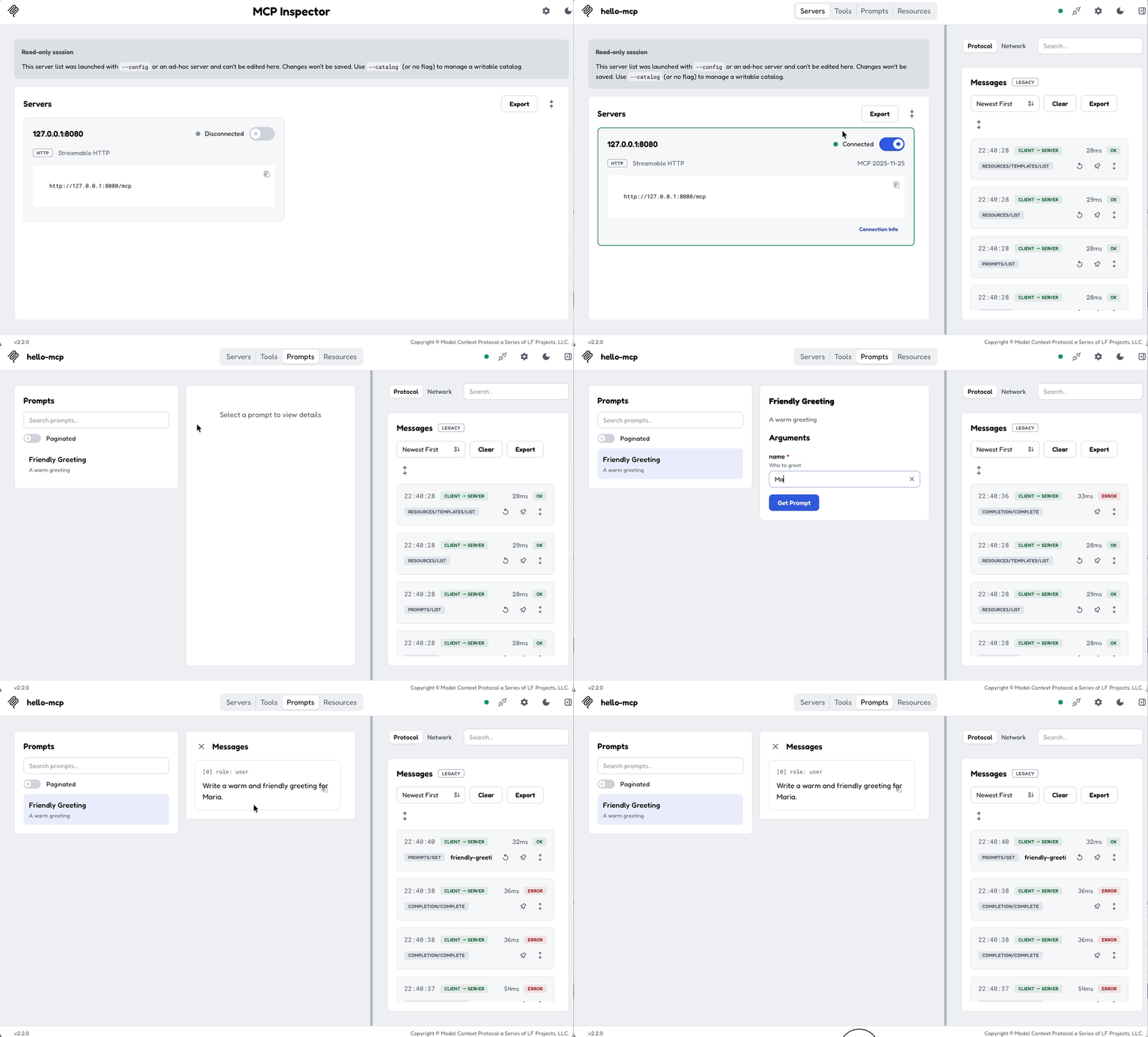
Step 4 - Test it
Rebuild, reconnect the MCP Inspector, and open the Prompts tab. You should see the Friendly Greeting prompt, select it , provide the parameter and click the Get Prompt button: