Add a Resource Template
Prerequisites: completed the Add a Resource.
What is a resource template?
In the Model Context Protocol (MCP), resource templates let a server expose parameterized resources that clients can read. They are useful when you have many resources that follow the same URI pattern, such as user profiles, orders, or documents.
Unlike tools, which allow clients to invoke actions or execute logic, resources are read-only: a client requests the contents of a resource, and the server returns the data.
A plain resource has one fixed URI. A resource template is a URI
pattern with {placeholders} — a single template can therefore address
many concrete URIs. Think of it as a parameterized GET endpoint:
users://{id}/profile
A client substitutes the placeholder to read a specific resource:
users://10001/profile
For example, our template maps {id} to a user id and returns their profile:
id: 10001
Alice Johnson
What we are going to build
In the Add a Resource tutorial we added
two static resources to src/resources.rs:
PlainTextResource→ a text resource (TextResourceContents)BlobResource→ a binary/blob resource served as base64 (BlobResourceContents)
Now we add a resource template:
UserProfileResource→ a resource template (users://{id}/profile) backed by a small in-memory "database" of ten users with 5-digit ids.
How the SDK models a resource template
The #[mcp_resource_template(...)] attribute macro turns a plain struct into a
template definition. It generates three associated (static) functions:
| method | returns |
|---|---|
resource_template_uri() | the URI template as &'static str (e.g. users://{id}/profile) |
resource_template_name() | the template name as &'static str |
resource_template() | a fully populated rust_mcp_schema::ResourceTemplate (advertised in resources/templates/list) |
Step 1 - Define the template in src/resources.rs
Add the two new imports at the top of src/resources.rs:
use rust_mcp_sdk::macros::mcp_resource_template;
use rust_mcp_sdk::schema::CompleteResultCompletion;
Append the following section to src/resources.rs. It adds a
UserProfileResource template with ten predefined users.
...
//******************************************************************************//
//  3. A RESOURCE TEMPLATE: USERS //{id}/profile                                 //
//******************************************************************************//

/// A **resource template** that serves a user's profile, chosen by the `{id}`
/// placeholder in the URI.
#[mcp_resource_template(
    name = "users",
    description = "A catalog of predefined users with 5-digit ids, addressable by id",
    title = "User Profile",
    mime_type = "text/plain",
    uri_template = "users://{id}/profile",
    audience = ["user", "assistant"],
    meta = r#"{
        "source": "hello-mcp tutorial",
        "kind": "user-profiles"
    }"#,
    icons = [
        ( src = "https://raw.githubusercontent.com/rust-mcp-stack/rust-mcp-sdk/main/assets/text-resource.png",
          sizes = ["96x96"],
          mime_type = "image/png" )
    ]
)]
pub struct UserProfileResource {}

impl UserProfileResource {
    /// The fixed prefix/suffix of every URI served by this template.
    /// `uri_template` declared in the macro above.
    const URI_PREFIX: &'static str = "users://";
    const URI_SUFFIX: &'static str = "/profile";

    /// The ten predefined users: `(id, full name)`.
    const USERS: &'static [(&'static str, &'static str)] = &[
        ("10001", "Alice Johnson"),
        ("10002", "Bob Smith"),
        ("10003", "Carol White"),
        ("10004", "David Brown"),
        ("10005", "Emma Davis"),
        ("10006", "Frank Miller"),
        ("10007", "Ali Hashemi"),
        ("10008", "Henry Moore"),
        ("10009", "Grace Wilson"),
        ("10010", "Jack Anderson"),
    ];

    /// Returns `true` if `uri` is addressed by this template.
    pub fn matches_url(uri: &str) -> bool {
        uri.starts_with(Self::URI_PREFIX) && uri.ends_with(Self::URI_SUFFIX)
    }

    /// Resolves a concrete URI like `users://10001/profile` into the user's profile.
    pub async fn contents(uri: &str) -> Result<ReadResourceResult, RpcError> {
        let id = uri
            .strip_prefix(Self::URI_PREFIX)
            .and_then(|s| s.strip_suffix(Self::URI_SUFFIX))
            .unwrap_or("");

        match Self::USERS.iter().find(|(user_id, _)| *user_id == id) {
            Some((user_id, full_name)) => Ok(ReadResourceResult {
                contents: vec![
                    TextResourceContents::new(
                        format!("id: {user_id}\n{full_name}"),
                        uri.to_string(),
                    )
                    .with_mime_type("text/plain")
                    .into(),
                ],
                meta: None,
            }),
            None => {
                let available: Vec<&str> =
                    Self::USERS.iter().map(|(user_id, _)| *user_id).collect();
                Err(RpcError::invalid_params().with_message(format!(
                    "User with id '{id}' was not found. Available ids: {}",
                    available.join(", ")
                )))
            }
        }
    }

    /// Suggests user ids that match the partial value the client has typed so far.
    /// This powers the `completions/complete` request: while the client types into
    pub fn completion(user_id: &str) -> CompleteResultCompletion {
        let matched_ids: Vec<String> = Self::USERS
            .iter()
            .map(|(id, _)| id.to_string())
            .filter(|id| id.starts_with(user_id))
            .collect();

        CompleteResultCompletion {
            has_more: None,
            total: Some(matched_ids.len() as i64),
            values: matched_ids,
        }
    }
}
...
Step 2 - update server capabilities to include completions
       ...
           capabilities: ServerCapabilities {
               tools: Some(ServerCapabilitiesTools::default()),
               resources: Some(ServerCapabilitiesResources::default()),
               completions: Some(serde_json::Map::new()),
               ..Default::default()
           },
       ...
Step 3 - update HelloMcpHandler to handle resource templates and completion calls
Update handle_list_resource_templates_request() in src/handler.rs so the template
is discoverable by clients. In the Add a Resource
tutorial it returned an empty list, now we populate it with
UserProfileResource::resource_template():
...
use crate::resources::UserProfileResource;
use rust_mcp_sdk::schema::{CompleteRequestParams, CompleteResult};
...
// Handle the `resources/templates/list` request: return the *templates*
// available on the server.
async fn handle_list_resource_templates_request(
    &self,
    _request: Option<PaginatedRequestParams>,
    _runtime: Arc<dyn McpServer>,
) -> Result<ListResourceTemplatesResult, RpcError> {
    Ok(ListResourceTemplatesResult {
        resource_templates: vec![UserProfileResource::resource_template()],
        meta: None,
        next_cursor: None,
    })
}
...
Step 4 - Serve the template contents
Update handle_read_resource_request to dispatch template URIs. Plain resources are
matched by their exact fixed URI, the template is matched by shape via
UserProfileResource::matches_url. Add this branch to the existing if chain:
async fn handle_read_resource_request(
&self,
params: ReadResourceRequestParams,
_runtime: Arc<dyn McpServer>,
) -> Result<ReadResourceResult, RpcError> {
if UserProfileResource::matches_url(¶ms.uri) {
return UserProfileResource::contents(¶ms.uri).await;
}
match params.uri.as_str() {
PlainTextResource::RESOURCE_URI => PlainTextResource::contents().await,
BlobResource::RESOURCE_URI => BlobResource::contents().await,
other => {
Err(RpcError::invalid_params().with_message(format!("Unknown resource: {other}")))
}
}
}
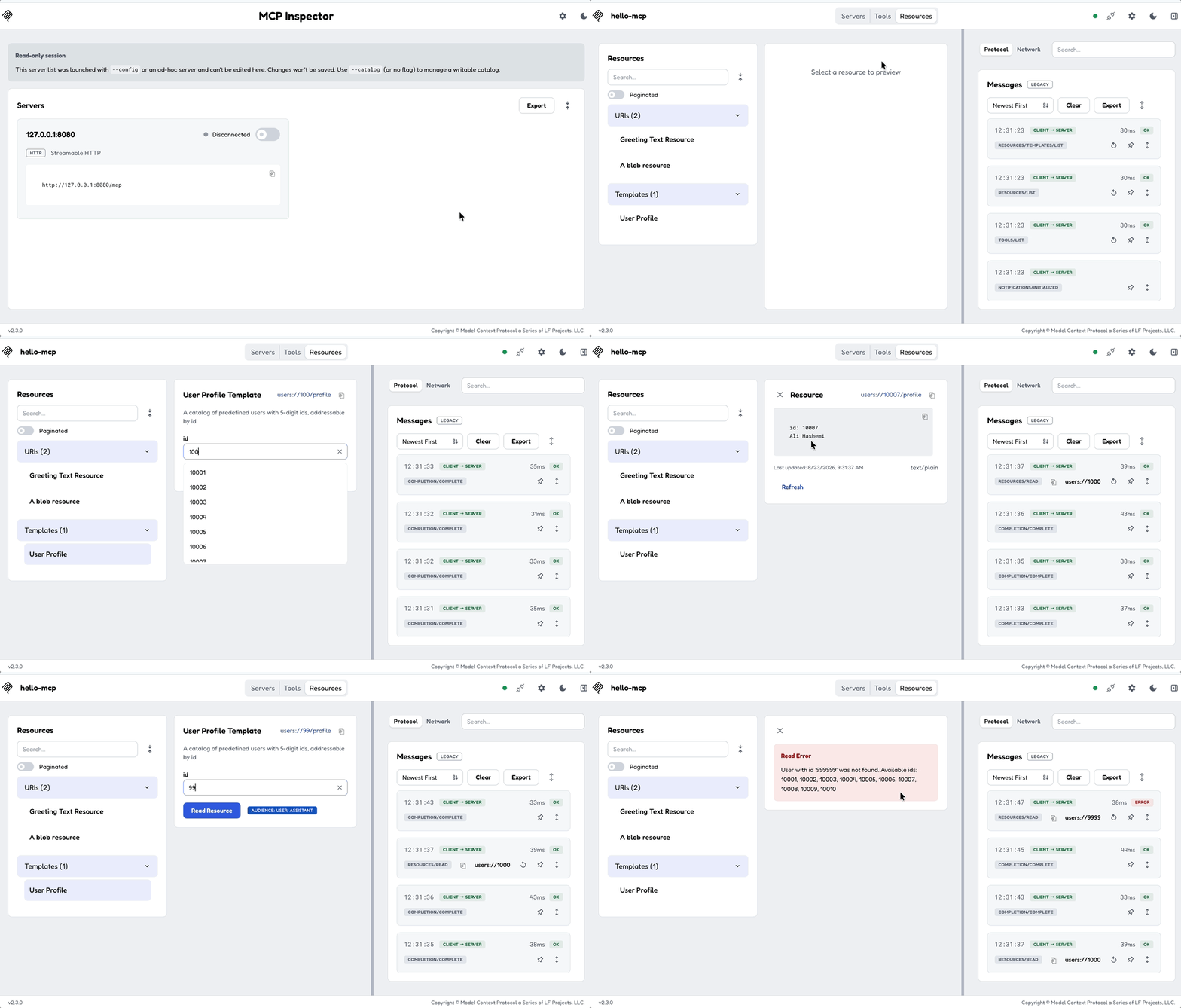
When a client requests users://10007/profile, matches_url is true and
get_resource returns:
id: 10007
Ali Hashemi
Requesting users://99999/profile returns an invalid_params error, since no user
with that id exists.
Step 4 - Add placeholder completion (optional but recommended)
Clients usually let users type into a template's {id} placeholder. The
completions/complete request asks the server for candidate values while the user
is still typing. Wire it up with a new handler method:
// Handle the `completions/complete` request: suggest values for a template
// `{placeholder}` (or a prompt argument) while the client is still typing.
async fn handle_complete_request(
&self,
params: CompleteRequestParams,
_runtime: Arc<dyn McpServer>,
) -> Result<CompleteResult, RpcError> {
if params.argument.name == "id" {
Ok(CompleteResult {
completion: UserProfileResource::completion(¶ms.argument.value),
meta: None,
})
} else {
Err(RpcError::method_not_found().with_message(format!(
"No completion is implemented for '{}'.",
params.argument.name,
)))
}
}
The placeholder name in params.argument.name must match the name used in the URI
template ({id}), otherwise completion returns method_not_found.
Step 5 - Test it
Rebuild, reconnect the MCP Inspector, and open the Resources tab. You should see
the User Profile template. Expand it, substitute an id such as 10007, and read
the resource to see:
id: 10007
Ali Hashemi
Next: Add a Prompt →