Build Your First MCP Client
You've built servers. Now build a client that connects to an MCP server, discovers what it offers, and invokes its tools - all from Rust code.
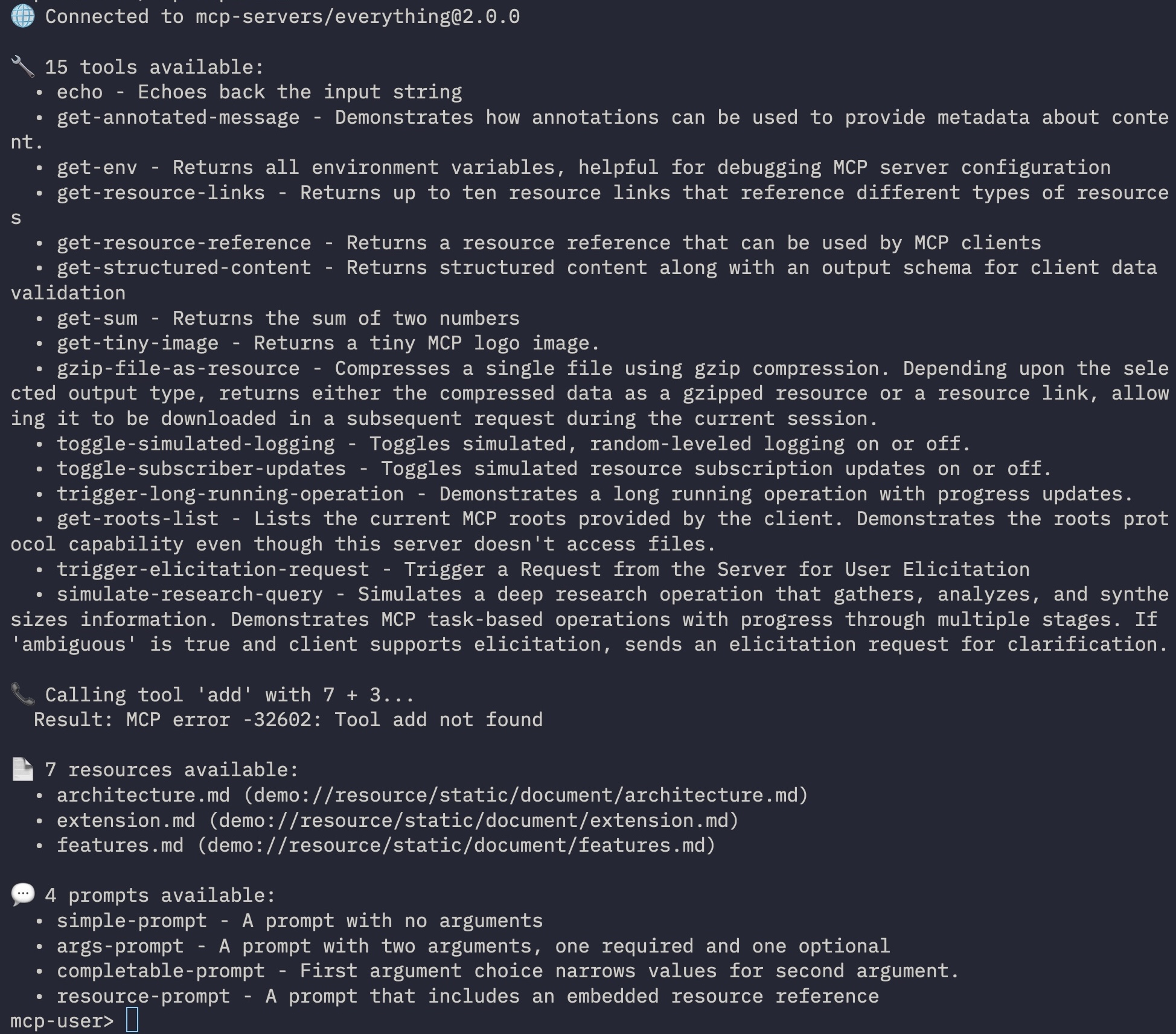
What you'll build: a client that connects to @modelcontextprotocol/server-everything (a test MCP server with tools, resources, prompts, and sampling), lists everything, and calls the add tool. We pin the server to a specific version so the output stays reproducible.
Prerequisites: Node.js installed (for npx to launch the test server).
Step 1 - Create the project
cargo new mcp-explorer && cd mcp-explorer
cargo add rust-mcp-sdk@1 async-trait tokio serde_json
Step 2 - Write the client
src/main.rs
use async_trait::async_trait;
use rust_mcp_sdk::{
    error::SdkResult,
    mcp_client::{client_runtime, ClientHandler, McpClientOptions},
    schema::{
        CallToolRequestParams, ClientCapabilities, ClientElicitation, ClientRoots,
        ContentBlock, Implementation, InitializeRequestParams, ProtocolVersion,
    },
    McpClient, StdioTransport, ToMcpClientHandler, TransportOptions,
};

pub struct ExplorerHandler;

#[async_trait]
impl ClientHandler for ExplorerHandler {}

#[tokio::main]
async fn main() -> SdkResult<()> {
    // ---- 1. Client identity ----
    let client_details = InitializeRequestParams {
        capabilities: ClientCapabilities {
            // Let the server know we can handle these
            roots: Some(ClientRoots::default()),
            elicitation: Some(ClientElicitation::default()),
            ..Default::default()
        },
        client_info: Implementation {
            name: "mcp-explorer".into(),
            version: "0.1.0".into(),
            description: Some("Explores MCP servers - lists tools, resources and prompts".into()),
            icons: vec![],
            website_url: None,
            title: Some("MCP Explorer".into()),
        },
        protocol_version: ProtocolVersion::V2025_11_25.into(),
        meta: None,
    };

    // ---- 2. Connect to the test server ----
    let transport = StdioTransport::create_with_server_launch(
        "npx",
        vec!["-y".into(), "@modelcontextprotocol/server-everything@2026.8.18".into()],
        None,
        TransportOptions::default(),
    )?;

    // create the MCP client
    let client = client_runtime::create_client(McpClientOptions {
        client_details,
        transport,
        handler: ExplorerHandler {}.to_mcp_client_handler(),
        task_store: None,
        server_task_store: None,
        message_observer: None,
    });

    // start the client
    client.clone().start().await?;

    // ---- 3. Server info ----
    let sv = client.server_version().unwrap();
    println!("🌐 Connected to {}@{}", sv.name, sv.version);

    // ---- 4. Discover tools ----
    let tools = client.request_tool_list(None).await?;
    println!("\n🔧 {tools_len} tools available:", tools_len = tools.tools.len());
    for t in &tools.tools {
        println!("  • {} - {}", t.name, t.description.as_deref().unwrap_or("no description"));
    }

    // ---- 5. Call a tool ----
    println!("\n📞 Calling tool 'add' with 7 + 3...");
    let result = client
        .request_tool_call(CallToolRequestParams {
            name: "add".into(),
            arguments: Some(serde_json::json!({ "a": 7, "b": 3 }).as_object().unwrap().clone()),
            meta: None,
            task: None,
        })
        .await?;

    for item in result.content {
        if let ContentBlock::TextContent(text) = item {
            println!("  Result: {}", text.text);
        }
    }

    // ---- 6. Discover resources ----
    if let Ok(resources) = client.request_resource_list(None).await {
        println!("\n📄 {resources_len} resources available:", resources_len = resources.resources.len());
        for r in resources.resources.iter().take(3) {
            println!("  • {} ({})", r.name, r.uri);
        }
    }

    // ---- 7. Discover prompts ----
    if let Ok(prompts) = client.request_prompt_list(None).await {
        println!("\n💬 {prompts_len} prompts available:", prompts_len = prompts.prompts.len());
        for p in &prompts.prompts {
            println!("  • {} - {}", p.name, p.description.as_deref().unwrap_or("no description"));
        }
    }

    client.shut_down().await?;
    Ok(())
}
Step 3 - Run it
cargo run
What you learned
- Initialize - declare your client identity and capabilities
- Transport -
StdioTransport::create_with_server_launchspawns the server - Discovery -
request_tool_list,request_resource_list,request_prompt_list - Calling tools -
request_tool_callwith typed arguments - Graceful shutdown -
client.shut_down()
Where next
- Connect to a Streamable HTTP server instead → Simple Client (Streamable HTTP)
- Handle auth-protected servers → Add OAuth to Your Server
- Use
ClientHandlerCorefor raw message control → ClientHandlerCore - Connect to YOUR own server from the guided path → Build a Client