Build Your First MCP Server
The Quickstart got you a server with a single say_hello tool, matched by name in the handler. This tutorial goes deeper: multiple tools with clean dispatch via tool_box!, proper error handling, and annotations that help LLMs use your tools safely.
Note: This tutorial stays focused on tools - check the Get Started path for Resources and Prompts.
What you'll build: a weather server with two tools (current_weather, forecast) that returns typed results with proper error handling.
Prerequisites: Quickstart completed. You understand the basic server structure.
Step 1 - Create the project
cargo new weather-mcp && cd weather-mcp
cargo add rust-mcp-sdk@1 async-trait tokio serde serde_json
Step 2 - Define your tools
Tools are Rust structs. The mcp_tool macro generates the MCP Tool spec plus JSON Schemas for the struct fields:
use rust_mcp_sdk::macros;

#[macros::mcp_tool(
    name = "current_weather",
    description = "Get the current weather for a city",
    read_only_hint = true,
)]
#[derive(Debug, serde::Deserialize, serde::Serialize, macros::JsonSchema)]
pub struct CurrentWeatherTool {
    /// City name (e.g. "London", "Tokyo")
    pub city: String,
    /// Temperature unit
    #[serde(default = "default_unit")]
    pub unit: String,
}

fn default_unit() -> String { "celsius".into() }

#[macros::mcp_tool(
    name = "forecast",
    description = "Get a 5-day weather forecast for a city",
    read_only_hint = true,
)]
#[derive(Debug, serde::Deserialize, serde::Serialize, macros::JsonSchema)]
pub struct ForecastTool {
    /// City name
    pub city: String,
    /// Number of days to forecast (1–5)
    pub days: u32,
}
Step 3 - Write the tool logic
Each tool struct gets call_tool() - the actual work. To keep the tutorial self-contained, the responses are hard-coded - no real weather service is called. Swap in your favorite weather API where noted if you want live data:
use rust_mcp_sdk::schema::{CallToolResult, schema_utils::CallToolError};

impl CurrentWeatherTool {
    pub fn call_tool(&self) -> Result<CallToolResult, CallToolError> {
        // In a real app, call a weather API here
        if self.city.is_empty() {
            return Err(CallToolError::from_message("City name is required"));
        }

        let temp = match self.unit.as_str() {
            "fahrenheit" => 75.0,
            _ => 24.0,
        };
        let unit_label = if self.unit == "fahrenheit" { "°F" } else { "°C" };

        Ok(CallToolResult::text_content(vec![format!(
            "Current weather in {}: {}{}, sunny",
            self.city, temp, unit_label
        )
        .into()]))
    }
}

impl ForecastTool {
    pub fn call_tool(&self) -> Result<CallToolResult, CallToolError> {
        if self.days < 1 || self.days > 5 {
            return Err(CallToolError::from_message(
                "Days must be between 1 and 5",
            ));
        }

        let lines: Vec<String> = (1..=self.days)
            .map(|d| format!("  Day {d}: {}°, partly cloudy", 20 + d))
            .collect();

        Ok(CallToolResult::text_content(vec![format!(
            "{}-day forecast for {}:\n{}",
            self.days,
            self.city,
            lines.join("\n")
        )
        .into()]))
    }
}
Step 4 - Organize with tool_box!
When you have multiple tools, use tool_box! to generate a dispatch enum:
use rust_mcp_sdk::tool_box;

tool_box!(WeatherTools, [CurrentWeatherTool, ForecastTool]);
This generates:
WeatherTools::tools()→Vec<Tool>for listingWeatherTools::try_from(CallToolRequestParams)→ parses and dispatches to the right variant
Step 5 - Write the handler
The handler just delegates to tool_box!:
use async_trait::async_trait;
use rust_mcp_sdk::{
    mcp_server::ServerHandler,
    schema::{ListToolsResult, PaginatedRequestParams, RpcError, schema_utils::CallToolError, CallToolRequestParams, CallToolResult},
    McpServer,
};
use std::sync::Arc;
use crate::tools::WeatherTools;

pub struct WeatherHandler;

#[async_trait]
impl ServerHandler for WeatherHandler {
    async fn handle_list_tools_request(
        &self,
        _request: Option<PaginatedRequestParams>,
        _runtime: Arc<dyn McpServer>,
    ) -> Result<ListToolsResult, RpcError> {
        Ok(ListToolsResult {
            tools: WeatherTools::tools(),
            meta: None,
            next_cursor: None,
        })
    }

    async fn handle_call_tool_request(
        &self,
        params: CallToolRequestParams,
        _runtime: Arc<dyn McpServer>,
    ) -> Result<CallToolResult, CallToolError> {
        // try_from matches the tool name, parses its arguments and returns
        // CallToolError for unknown tools or invalid arguments
        let tool: WeatherTools = WeatherTools::try_from(params)?;

        match tool {
            WeatherTools::CurrentWeatherTool(t) => t.call_tool(),
            WeatherTools::ForecastTool(t) => t.call_tool(),
        }
    }
}
Step 6 - Start the server
- Stdio
- Streamable HTTP
mod tools;
mod handler;

use rust_mcp_sdk::{
    error::SdkResult,
    mcp_server::{server_runtime, McpServerOptions},
    schema::{
        Implementation, InitializeResult, ProtocolVersion, ServerCapabilities,
        ServerCapabilitiesTools,
    },
    McpServer, StdioTransport, ToMcpServerHandler, TransportOptions,
};
use handler::WeatherHandler;

#[tokio::main]
async fn main() -> SdkResult<()> {
    // server name, version and capabilities
    let server_details = InitializeResult {
        server_info: Implementation {
            name: "weather-mcp".into(),
            version: "1.0.0".into(),
            description: Some("A weather server with current conditions and forecasts".into()),
            icons: vec![],
            website_url: None,
            title: Some("Weather MCP Server".into()),
        },
        capabilities: ServerCapabilities {
            tools: Some(ServerCapabilitiesTools::default()),
            ..Default::default()
        },
        protocol_version: ProtocolVersion::V2025_11_25.into(),
        instructions: None,
        meta: None,
    };

    let transport = StdioTransport::new(TransportOptions::default())?;

    // instantiate our custom handler for handling MCP messages
    let handler = WeatherHandler {};

    // create the MCP server
    let server = server_runtime::create_server(McpServerOptions {
        server_details,
        transport,
        handler: handler.to_mcp_server_handler(),
        task_store: None,
        client_task_store: None,
        message_observer: None,
    });

    // Start the server
    server.start().await
}
cargo add rust-mcp-axum
mod tools;
mod handler;

use rust_mcp_sdk::{
    ToMcpServerHandler,
    error::SdkResult,
    schema::{
        Implementation, InitializeResult, ProtocolVersion, ServerCapabilities,
        ServerCapabilitiesTools,
    },
};

use handler::WeatherHandler;

#[tokio::main]
async fn main() -> SdkResult<()> {
    // server name, version and capabilities
    let server_details = InitializeResult {
        server_info: Implementation {
            name: "weather-mcp".into(),
            version: "1.0.0".into(),
            description: Some("A weather server with current conditions and forecasts".into()),
            icons: vec![],
            website_url: None,
            title: Some("Weather MCP Server".into()),
        },
        capabilities: ServerCapabilities {
            tools: Some(ServerCapabilitiesTools::default()),
            ..Default::default()
        },
        protocol_version: ProtocolVersion::V2025_11_25.into(),
        instructions: None,
        meta: None,
    };

    // instantiate our custom handler for handling MCP messages
    let handler = WeatherHandler {};

    // create the MCP server
    let server = rust_mcp_axum::create_axum_server(
        server_details,
        handler.to_mcp_server_handler(),
        rust_mcp_axum::AxumServerOptions::default(),
    );

    // Start the server. by default, the MCP server is available at `http://127.0.0.1:8080/mcp`.
    server.start().await?;
    Ok(())
}
Step 7 - Test it
Test your server with the MCP Inspector:
- Stdio
- Streamable HTTP
Build the release binary, then pass its absolute path to the Inspector:
cargo build --release
npx -y @modelcontextprotocol/inspector@latest /Users/Shared/weather-mcp/target/release/weather-mcp
Start the server:
cargo run
Then launch the Inspector against it:
npx -y @modelcontextprotocol/inspector@latest \
  --transport http \
  --server-url http://127.0.0.1:8080/mcp
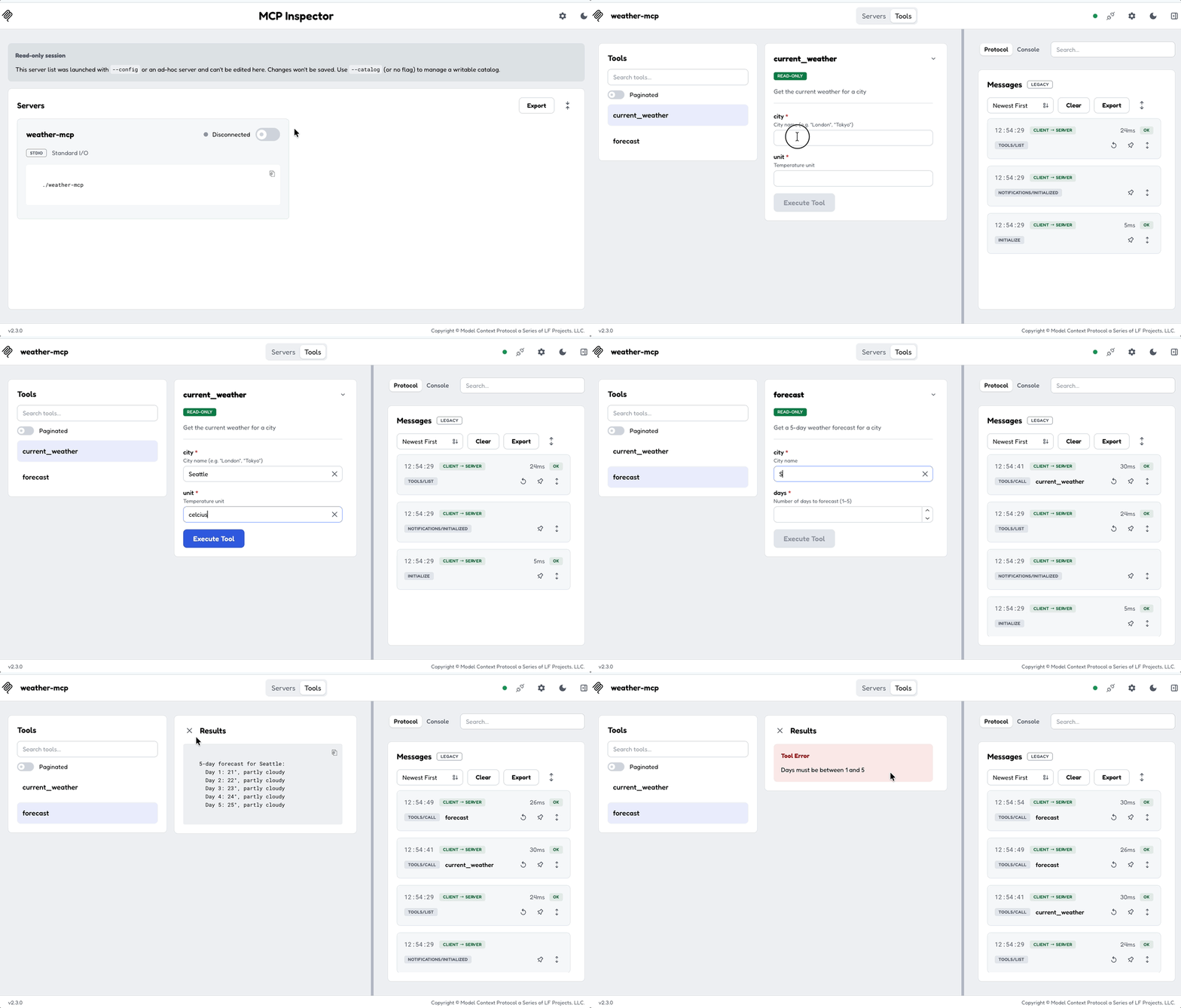
In the MCP Inspector you'll see two tools: current_weather and forecast. Try providing bad input - a forecast for 8 days, say - and the server returns a clear error message.
What you learned
- Multiple tools with
mcp_tool+tool_box!for clean dispatch - Validation - return
CallToolErrorfor bad input - Annotations -
read_only_hint = truetells clients these are safe to call without confirmation - Organization - tools in their own module, handler delegates to
tool_box!
Where next
- Deploy Your Server over HTTP - production HTTP setup with health checks
- Client tutorial - connect to your weather server programmatically
- Tools reference - all tool options
- Macros reference - every
mcp_toolattribute