Add a Resource
Your server from the Quickstart can answer tool calls. Now let's expose data the LLM can read - called a resource.
Prerequisites: completed the Quickstart.
What is a resource?
In the Model Context Protocol (MCP), resources are pieces of data (text or binary/blobs) that a server exposes to clients so they can read contextual information. Unlike tools, which let clients do something (execute logic), resources are read-only: a client asks "give me the data at this URI" and the server answers with the contents. Resources are like read-only GET endpoints: files, documents, database rows - anything the client can fetch by URI. Each resource has:
- a URI (e.g.
app://greeting.txt) - a name and MIME type
- contents (text or base64 blob)
We are going to add a resources module and define two different resource kinds with the
rust-mcp-sdk:
1- [PlainTextResource] → a text resource (TextResourceContents)
2- [BlobResource] → a binary/blob resource served as base64 (BlobResourceContents)
3- [ColorsResource] → a resource template (app://colors/{id}) whose contents depend on the concrete {id} in the URI
Step 1 - Define the resource
Create a new module for the resources and define them using the resource macros provided by rust_mcp_sdk.
...
mod resources;
...
use rust_mcp_sdk::{
    macros::mcp_resource,
    schema::{BlobResourceContents, ReadResourceResult, RpcError, TextResourceContents},
};

//******************************************************************************//
//  1. A TEXT RESOURCE                                                          //
//******************************************************************************//

/// A text resource that returns a simple greeting string.
/// The `uri` must be **unique** across the server - it is how clients address this
/// specific resource in a `resources/read` request.
#[mcp_resource(
    uri = "app://greeting.txt",
    name = "Greeting Text Resource",
    description = "A friendly greeting stored on the server",
    mime_type = "text/plain"
)]
#[derive(Debug)]
pub struct PlainTextResource;

impl PlainTextResource {
    /// Builds the **contents** returned when a client reads this resource
    /// Note the `.into()` call: it converts the `TextResourceContents` struct into
    /// the `ReadResourceContent` enum variant expected by `contents`.
    pub async fn contents() -> Result<ReadResourceResult, RpcError> {
        Ok(ReadResourceResult {
            contents: vec![
                TextResourceContents {
                    uri: "app://greeting.txt".into(),
                    mime_type: Some("text/plain".into()),
                    text: "Hello from a server resource!".into(),
                    meta: None,
                }
                .into(),
            ],
            meta: None,
        })
    }
}

//******************************************************************************//
//  2. A BLOB (BINARY) RESOURCE                                                  //
//******************************************************************************//

/// A **binary/blob** resource demonstrating how to serve non-text data
/// (here: an SVG image) over MCP.
#[mcp_resource(
    name = "Blob SVG Resource",
    description = "A blob resource",
    title = "A blob resource",
    mime_type = "image/svg+xml",
    uri="app://static/blob/svg",
    icons = [
        ( src = "https://raw.githubusercontent.com/rust-mcp-stack/rust-mcp-sdk/main/assets/blob-resource.png",
          sizes = ["128x128"],
          mime_type = "image/png" )
    ]
)]
pub struct BlobResource {}

impl BlobResource {
    /// The SVG image we serve, **base64-encoded**.
    /// Decoded, it is a tiny 50×50 SVG: a blue circle with a light-blue outline.
    /// ```svg
    /// <svg xmlns='http://www.w3.org/2000/svg' width='50' height='50'>
    ///   <circle cx='25' cy='25' r='23' fill='#0F4A72' stroke='#63E3FD' stroke-width='4'/>
    /// </svg>
    /// ```
    const BASE_64_SVG: &'static str = "data:image/svg+xml;base64,PHN2ZyB4bWxucz0naHR0cDovL3d3dy53My5vcmcvMjAwMC9zdmcnIHdpZHRoPSc1MCcgaGVpZ2h0PSc1MCc+PGNpcmNsZSBjeD0nMjUnIGN5PScyNScgcj0nMjMnIGZpbGw9JyMwRjRBNzInIHN0cm9rZT0nIzYzRTNGRCcgc3Ryb2tlLXdpZHRoPSc0Jy8+PC9zdmc+";

    /// Builds the **contents** returned when a client reads this resource.
    pub async fn contents() -> Result<ReadResourceResult, RpcError> {
        Ok(ReadResourceResult {
            contents: vec![
                BlobResourceContents::new(Self::BASE_64_SVG, Self::resource_uri())
                    .with_mime_type("image/svg+xml")
                    .into(),
            ],
            meta: None,
        })
    }
}
The #[mcp_resource(...)] macro turns a plain Rust struct into a resource
definition. For each annotated struct it generates the following associated
(static) functions, used by the SDK/runtime to describe the resource to clients:
resource_uri()→ returns the resource's URI as&'static strresource_name()→ returns the resource's name as&'static strresource()→ returns a fully populatedrust_mcp_schema::Resource(the metadata object sent back inresources/list)
The contents() methods written by hand, producing the actual contents
that get returned for a resources/read request.
Step 2 - update server capabilities to include resources
...
use rust_mcp_sdk::schema::ServerCapabilitiesResources;
...
    capabilities: ServerCapabilities {
        tools: Some(ServerCapabilitiesTools::default()),
        resources: Some(ServerCapabilitiesResources::default()),
        ..Default::default()
    },
...
Step 3 - update HelloMcpHandler to handle resource calls
Add two handler methods to your HelloMcpHandler: one to return the list of available resources and another to return the content of a requested resource.
...
use crate::resources::{BlobResource, PlainTextResource};
use rust_mcp_sdk::schema::{ListResourcesResult, ListResourceTemplatesResult, ReadResourceRequestParams, ReadResourceResult};

...
/// Handle the `resources/list` request: return the metadata of every resource
/// the server exposes so the client can discover them.
async fn handle_list_resources_request(
    &self,
    _request: Option<PaginatedRequestParams>,
    _runtime: Arc<dyn McpServer>,
) -> Result<ListResourcesResult, RpcError> {
    Ok(ListResourcesResult {
        resources: vec![PlainTextResource::resource(), BlobResource::resource()],
        meta: None,
        next_cursor: None,
    })
}

/// Handle the `resources/read` request: return the *contents* of the resource
/// the client asked for.
async fn handle_read_resource_request(
    &self,
    params: ReadResourceRequestParams,
    _runtime: Arc<dyn McpServer>,
) -> Result<ReadResourceResult, RpcError> {
    match params.uri.as_str() {
        PlainTextResource::RESOURCE_URI => PlainTextResource::contents().await,
        BlobResource::RESOURCE_URI => BlobResource::contents().await,
        other => {
            Err(RpcError::invalid_params().with_message(format!("Unknown resource: {other}")))
        }
    }
}

/// returning an empty resource template list for now
  async fn handle_list_resource_templates_request(
      &self,
      _request: Option<PaginatedRequestParams>,
      _runtime: Arc<dyn McpServer>,
  ) -> Result<ListResourceTemplatesResult, RpcError> {
      Ok(ListResourceTemplatesResult {
          resource_templates: vec![],
          meta: None,
          next_cursor: None,
      })
  }
...
Step 4 - Test it
Rebuild, reconnect the MCP Inspector, and open the Resources tab. You should see both resources - click them to read the contents:
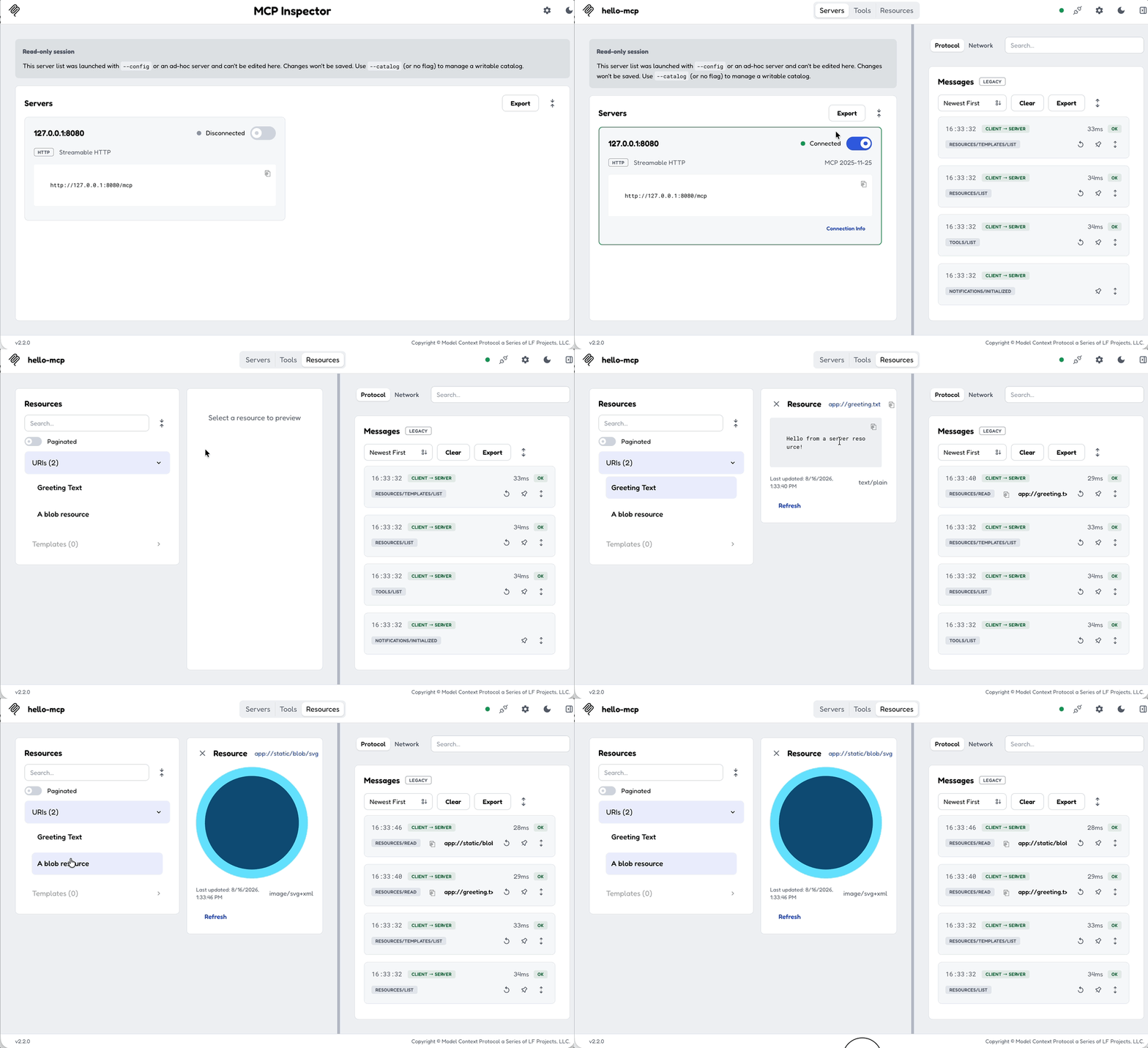
Resources are well suited for static content. For parameterized URIs such as users://{id}/profile, use Resource Templates instead.
Next: Add a Resource Template →